Your own streaming service.
It just works.
Lunaris turns your Mac into a private media server in about fifteen minutes — then keeps it running so you never think about it again. Every file yours. No subscription.
One-time $29 for the first 100 licenses · then $59 · 14-day money-back guarantee
One minute. One Mac. Eleven services, running themselves.
The same tools power users spend a weekend wiring together, wired for you in one click.
any given 11 PM
Self-hosting media has always meant doing it the hard way.
Everyone who's tried this knows the drill: a 4,000-word guide, Docker, six containers each with its own way to break, an hour fighting the VPN. And then it works. For a while.
Then you sit down on a Friday to watch something, and it won't play. A download stalled at 99%. A service crashed overnight. An update changed a setting and nothing talks to anything anymore. Now you're troubleshooting at 11pm instead of watching the movie you sat down for.
The tools are great. The work of running them never stops. Lunaris takes that over, so the next time you sit down to watch, it just plays.
From download to movie night, one afternoon.
Download it. Open it.
One signed Mac app. The setup wizard makes every technical decision — runtime, VPN, quality profiles, subtitles. You pick Plex or Jellyfin and sign in.
Add the first few movies.
Browse inside Lunaris or add from your watchlist on any device. Downloads run sealed behind the VPN and file themselves, subtitled and organized.
Couch. Remote. Play.
Your library looks like a streaming service on the TV — posters, resume-where-you-left-off, every screen in the house. Except nothing in it expires.
The skeptic's timeline
"These setups always
die in a month."
Everyone knows someone whose home server lasted three weekends. The entire point of Lunaris is how this conversation ends: the setup that took one sitting is still running a semester later, untouched.
- Crashes restart and stalled downloads resume on their own
- Updates apply behind a health check — and roll back if they fail
- The menu bar crescent is all the checking-in most weeks get
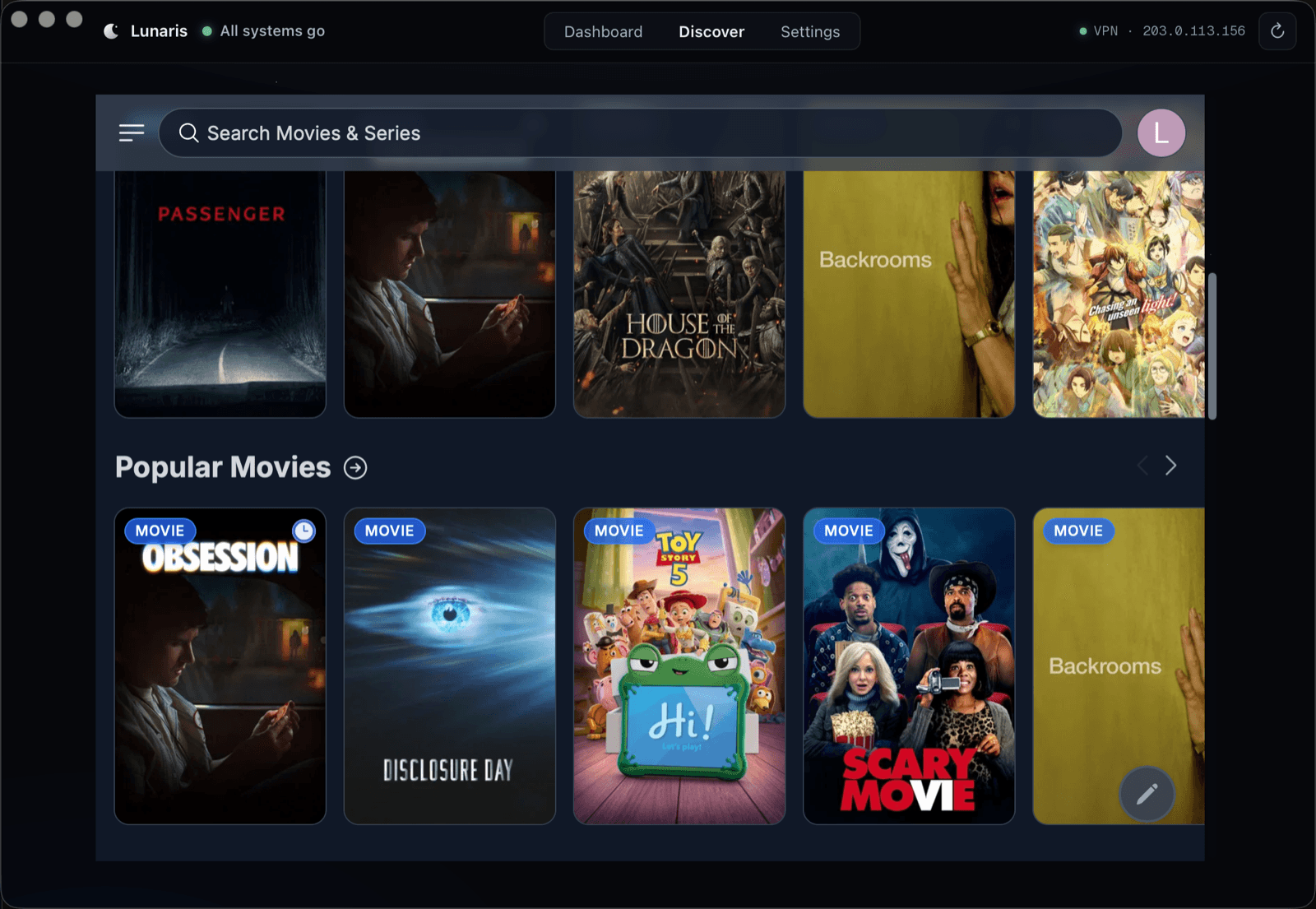
One app, the whole stack.
Nine services, one hand on all of them. Lunaris runs the whole stack and holds every piece in conversation.
Fixes itself
A crashed service restarts, a stalled download recovers, and if your VPN provider goes down, Lunaris can switch to your backup credentials on its own — all before you notice.
One-click everything
Every service arrives already talking to the rest: indexers feed the library, subtitles find their episodes, requests flow straight to downloads.
Private by default
Every download rides an encrypted VPN, sealed by a kill switch: if the tunnel drops, the downloader goes silent instead of falling back to your real connection. Set up for you, always on.
The whole house can ask
Browse and add inside Lunaris, add to your Plex watchlist from any device, or let the family request shows from their own phones — no touching the server. It all just arrives.
Plays on everything
Streams to the Plex and Jellyfin apps on your TV, phone, and laptop, with everyone's watch progress kept. Your library, on every screen in the house.
Clean and organized
Matched titles, real posters, subtitles, named episodes, grouped sequels. Library on an external drive or a NAS? Lunaris guards it: nothing starts if the storage isn't there.
NEW · MCP BUILT IN
Bring your own AI on shift.
Ask it anything. It can actually look.
Lunaris is an MCP server, so Claude — or any AI that speaks the Model Context Protocol — can connect straight to your stack: read live status, pull service logs, and restart what's stuck. Setup is pasting one snippet into your AI app.
- Reads the same status and logs the dashboard shows you
- Secrets are scrubbed before the AI ever sees a log line
- One power: restart a service. No path to touch your media, by construction
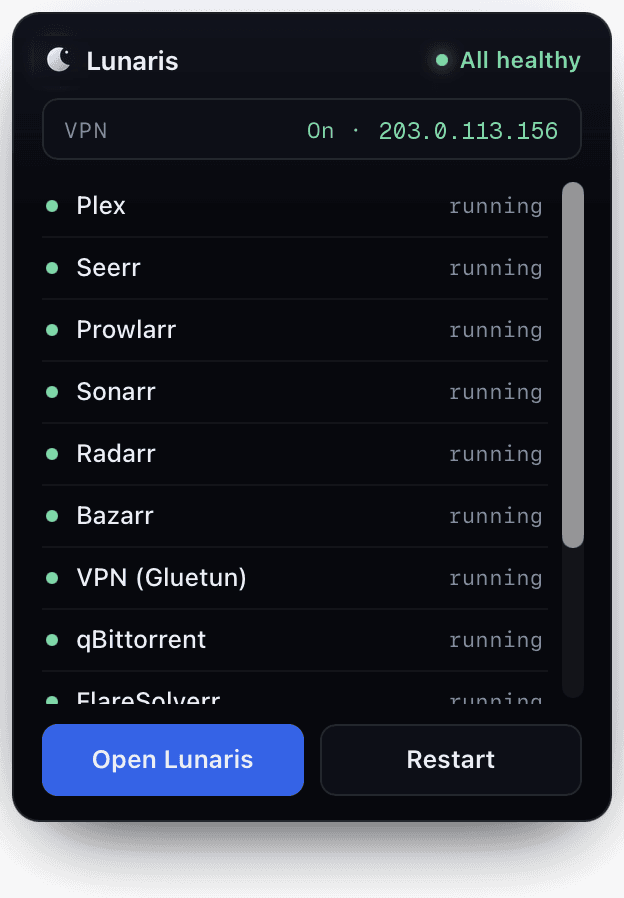
Always at a glance
One verdict,
wherever you are.
At the Mac, the crescent in your menu bar holds the whole story: every service, the VPN line, a restart button. Away from it, flip on remote access and Lunaris serves its own status page on your home network — which is how a Mac mini in a closet runs the entire stack with no monitor attached.
- Remote access is off by default. The link carries its own key, so only people you share it with can open it
- Start-at-login keeps the night shift on duty through reboots and power cuts
- Library on an external drive or NAS? Lunaris reconnects it on its own, and refuses to start without it so nothing ever rebuilds onto the wrong disk
What happens when you press Add.
Every step of it, in the dark, without you.
You press Add
Browse in Discover, pick anything. That's your whole job.
The best copy is found
Indexers searched, releases scored against your quality rules.
- VPN · kill switch
Downloaded in the tunnel
Sealed inside the VPN with the kill switch armed. Nothing leaks.
Named, filed, subtitled
Renamed to match your library, sorted into place, subtitles fetched.
Ready to watch
It appears in Plex — or Jellyfin — on every device. Press play.
Pay once. Own it for good.
Lunaris is a paid Mac app, and here's why that matters: a weekend of free scripts isn't the same as software that answers for the result.
It's maintained, not abandoned
A stack of services, a VPN, indexers, and constant updates make a moving target. Lunaris keeps them working release after release, so nothing rots the first time something upstream changes.
Buy once, no subscription
One payment, and every Lunaris 1.x update is included. Founders go further: the first 100 get every future version, majors included, free forever.
You own it
No subscription, no account that can lock you out of your own library. The app and everything in it are yours.
The price for the first 100 founders. After that it's $59.
- The full Lunaris Mac app, Apple Silicon and Intel
- Every future update included, major versions too
- Self-healing setup and maintenance, handled
- Runs headless: remote status page for screen-less Macs
- Connect your AI: built-in MCP server for diagnosis by chat
- Founder support and a say in the roadmap
Instant download after checkout, and no account to create. 14-day money-back guarantee.
The things people ask first
Stop babysitting your media server.
Start owning it.
Lunaris is out. $29 one-time for the first 100 founders, downloading a minute from now.